
How to check if APK is safe is an important question before installing any application outside the usual app store. An APK file can install an Android application, but the file itself should be checked before you open or install it.
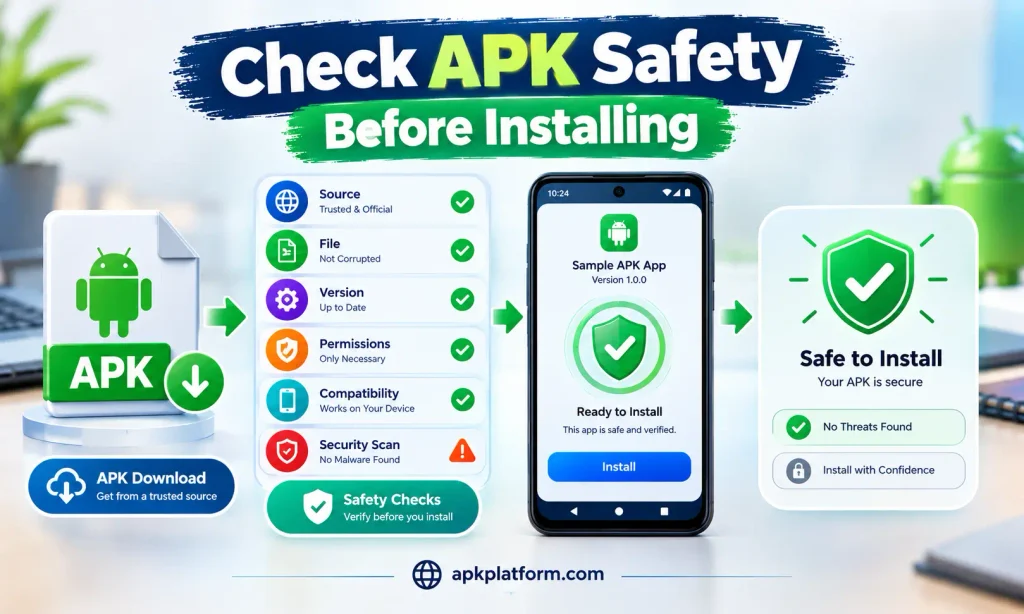
Checking the download source, APK details, requested permissions, Android compatibility, file behavior, and security warnings can help you make a more informed decision. No single check can guarantee that an APK is completely safe, so it is better to consider several factors together.
This guide explains how to check an APK before installation, what warning signs to look for, and how to reduce unnecessary security risks on Android.
What Is an APK File?
APK stands for Android Package Kit. It is the package format used to distribute and install applications on Android devices.
When you install an APK, Android processes the package and adds the application to your device. The APK may come from a website, file-sharing service, backup, or another source.
Because APK files can come from different sources, it is important to evaluate the file before installing it.
An APK should not be considered safe simply because the file has an Android icon or because the download page looks professional.
How to Check if APK Is Safe Before Installation
How to check if APK is safe depends on several factors rather than one simple test.
Before installing an APK, check:
- The download source
- APK file name and details
- File size
- Application version
- Android compatibility
- Requested permissions
- Security warnings
- Unexpected redirects or download behavior
- Whether the file has been modified
- Whether the application asks for unusual information
These checks can help you identify potentially suspicious files before they are installed.
Before installing an APK-based game, users should also review the available safety and app information, such as the details provided in our 786 Bet Game APK guide.
1. Check the APK Download Source
The first thing to consider is where the APK came from.
A trustworthy and clearly identifiable source is preferable to an unknown download page. Be careful with websites that use misleading buttons, repeated redirects, pop-ups, or instructions asking you to disable security features unnecessarily.
Before downloading, check:
- Website address
- Application name
- Developer or publisher information
- Version information
- File details
- Download instructions
Avoid downloading APK files from links sent by unknown people or from suspicious messages.
If a website asks you to install another unknown application before providing the APK, stop and review the situation carefully.
2. Check the APK File Name
After downloading an APK, check its file name before opening it.
The file name should normally provide some indication of the application and version.
Be cautious if the file has:
- A misleading application name
- Multiple unrelated names
- Strange characters
- An unexpected extension
- A name that does not match the application you intended to download
An APK file normally ends with the .apk extension.
A file with a different extension should not be treated as a normal APK installation package.
3. Check the APK Version
Check the version number before installing the file.
If a download page says one version but the downloaded file appears to represent another version, investigate before installation.
Version information can also help you avoid installing an outdated package when a newer version is required for your device.
However, a newer version is not automatically safer. The source and file itself should still be evaluated.
4. Check the APK File Size
File size can provide another useful clue.
If an application normally requires a substantial installation package but the downloaded file is unexpectedly tiny, or the file size differs significantly from the information provided with the download, investigate before opening it.
File size alone cannot prove whether an APK is safe.
A small APK can be legitimate, and a large APK can still be problematic. Use file size as one part of a broader check rather than treating it as a security guarantee.
If you are checking the safety of a game APK before installation, you can also review the APK and installation information in our 98S Game guide.
5. Check Android Compatibility
Before installation, check whether the APK is compatible with your Android phone.
Important compatibility details may include:
- Minimum Android version
- Supported processor architecture
- Required device features
- Storage requirements
- Application version
An incompatible APK may fail to install or may cause problems after installation.
If you are already experiencing an installation problem, check your Android version and available storage before repeatedly downloading different APK files.
6. Review APK Permissions
Application permissions are an important part of APK safety.
Android applications may request access to features such as:
- Camera
- Microphone
- Location
- Contacts
- Files and media
- Notifications
- Phone functions
The permissions requested should make sense for the application’s purpose.
For example, an application that has no obvious reason to access contacts or the microphone deserves additional attention if it requests those permissions.
Do not automatically approve every permission request simply because the application will not work until permission is granted.
Review the request and decide whether it is necessary.
7. Watch for Unusual Permission Requests
Some permissions can provide an application with significant access to your device or information.
Be especially careful when an application asks for permissions that seem unrelated to its basic function.
You should also be cautious if an installation guide tells you to grant broad access without explaining why it is required.
If you do not understand a permission request, research the application first rather than approving it immediately.
8. Check Android Security Warnings
Pay attention to warnings displayed by Android during download or installation.
If Android displays a security warning, do not ignore it automatically.
Read the warning and consider why it appeared.
Depending on the Android version and device configuration, security features may warn about potentially harmful applications or applications from unknown sources.
Disabling security features simply to complete an installation can increase risk. Only change a security setting when you understand why it is required and what the setting does.
For additional Android security and device guidance, you can also refer to Google’s official Android Help.
9. Check the APK Before Opening It
Do not open an APK immediately after downloading it.
First, check the file location, name, size, and source.
If your phone’s security tools provide a way to scan or review the file, use the available security features before installation.
You can also keep Android’s built-in security features enabled while evaluating the file.
The goal is to identify potential problems before the APK becomes an installed application.
10. Be Careful With Modified APK Files
Modified APK files may have changes that are not present in the original application package.
A modified file can be difficult to evaluate if you do not know exactly what has been changed.
Be cautious with APK descriptions that make unrealistic claims about unlocked features, unlimited resources, special access, or other unusual modifications.
If you do not need a modified version, using the standard version from a trustworthy source can reduce unnecessary uncertainty.
11. Avoid Fake APK Download Buttons
Some download pages contain multiple buttons that look like the real APK download option.
A misleading button may start another download, redirect you to a different website, or ask you to install unrelated software.
Before clicking:
- Check the button text.
- Look at where the link leads when possible.
- Avoid unexpected pop-ups.
- Close suspicious tabs.
- Do not install additional applications just to access the APK.
If the download process becomes confusing or repeatedly redirects you, stop and reassess the source.
12. Be Careful With APKs Sent Through Messages
APK files sent through messaging apps, email, social media, or unknown contacts should be treated carefully.
Even if the file has a familiar name, that does not establish that it is safe.
Before opening a received APK, consider:
- Who sent it
- Why it was sent
- Whether you expected it
- Whether the application name is correct
- Whether the file comes from an identifiable source
Do not install an unexpected APK simply because someone tells you it is required.
13. Check for Unusual Installation Instructions
Pay attention to instructions that ask you to make major security changes.
Be cautious if a download page tells you to:
- Disable multiple security settings
- Turn off device protection permanently
- Grant unrelated permissions
- Install several additional APKs
- Provide account passwords
- Share OTPs or PINs
- Send payment information to an unofficial contact
A normal APK installation should not require you to share private account credentials.
APK Safety for Android Games
Android game APKs should be checked in the same way as other APK files.
Before installing an APK-based game, review the download source, application version, Android requirements, permissions, and file details.
Before installing an APK-based game, users should also review the available safety and app information, such as the details provided in our [786 Bet Game APK] guide.
You can also review the installation and safety information available in our [Zor77 Game APK] guide.
If an Android game involves registration, deposits, withdrawals, or account access, keep your login credentials, passwords, OTPs, and PINs private.
Payment instructions should also be checked carefully. Do not send money to an unofficial account or individual simply because an APK page displays a payment request.
Can Antivirus Tools Check an APK?
Some Android security tools can scan applications and files for known threats or suspicious behavior.
A security scan can be useful, but no scan should be treated as an absolute guarantee that an APK is safe.
Keep your device’s security software updated and pay attention to warnings.
If a security tool identifies a problem with an APK, avoid installing the file until you understand the warning and have verified the source.
Is a Safe-Looking APK Always Safe?
No.
An APK can have a professional-looking name, icon, and download page while still requiring additional verification.
Similarly, a warning does not always mean that a file is definitely malicious. Security alerts can depend on the application’s source, installation method, behavior, and other factors.
That is why it is better to evaluate multiple signals rather than relying on appearance alone.
What Should You Do If an APK Looks Suspicious?
If an APK appears suspicious, do not install it.
You can:
- Delete the downloaded file.
- Close suspicious browser pages.
- Run an available security scan.
- Check your device for unusual applications.
- Review recently granted permissions.
- Change important account credentials if you entered them on a suspicious page.
- Monitor the device for unexpected behavior.
If you have already installed a suspicious application, consider uninstalling it and reviewing your Android security settings.
How to Check an APK Before Installing: Quick Checklist
Use this checklist before opening an APK:
- Check the download source.
- Confirm the application name.
- Check the APK extension.
- Review the version number.
- Compare the file size with available information.
- Check Android compatibility.
- Review requested permissions.
- Pay attention to Android security warnings.
- Avoid suspicious redirects.
- Be careful with modified APKs.
- Never share passwords, OTPs, or PINs.
- Avoid unofficial payment requests.
- Scan the file when a trusted security feature is available.
These steps cannot guarantee that every APK is safe, but they can help reduce avoidable risks.
If you want to review the basic safety steps before installing an APK, you can also follow our APK Installation Guide for Android Beginners.
FAQs
How to check if APK is safe?
Check the APK’s download source, file name, version, size, Android compatibility, requested permissions, security warnings, and installation behavior. Consider these factors together rather than relying on one test.
Can an APK contain malware?
Yes. APK files can contain harmful software, particularly when downloaded from unknown or untrustworthy sources. Review the source and use available Android security features before installation.
Is every APK from a website unsafe?
No. The fact that an APK is downloaded from a website does not automatically make it unsafe. However, the source, file, permissions, and security information should be checked carefully.
Should I install an APK if Android shows a warning?
Read the warning before continuing. If you do not understand the reason for the warning or cannot verify the APK source, avoid installing the file.
Can I check APK permissions before installing it?
The exact information available before installation can vary by Android version and application package. You should review the application’s permission requests during installation and after installation.
Are modified APK files safe?
A modified APK should be treated cautiously because you may not know exactly what was changed. Avoid files that make unrealistic claims or come from unidentified sources.
Should I disable Android security to install an APK?
Avoid disabling security features unnecessarily. If an APK installation requires a security setting to be changed, understand the reason and the potential risks before proceeding.
What should I do with a suspicious APK?
Do not install it. Delete the file and use available Android security tools to check your device if you have already opened or installed it.
Final Thoughts
How to check if APK is safe is not a question that can be answered by checking only one detail. A better approach is to review the APK source, file information, compatibility, permissions, security warnings, and installation behavior together.
Be particularly careful with unknown download pages, modified APKs, unexpected files, unusual permission requests, and instructions asking you to disable security protections or share private information.
If an APK cannot be verified or appears suspicious, avoiding the installation is the safer option. For more Android APK guides, installation information, troubleshooting tips, and app safety resources, visit our homepage.